
The Responsive UI & Layout Engine for Web Games
Design complex, resolution-independent UI for Pixi.js and Phaser without writing a single line of layout code
Does this sound familiar?
zStudio was built to solve exactly these problems.
Stop Hard-Coding Layouts. Build Once, Run Everywhere.
The layout tool that lets artists own the UI pipeline and lets developers focus on game logic — not pixel math.
Responsive Layout Without a Single Line of Code
Anchor system for relative positioning that adapts to any screen size. Design once — portrait, landscape, desktop, and every ad network dimension handled automatically.
Seamless Pixi.js, Phaser & HTML Integration
Export your scene as JSON. Load it in your project with 5 lines of code via our zImporter package. All positions, anchors, animations, and hierarchies preserved — pixel-perfect, every time.
Visual Animation Timeline
Keyframe-based timeline with easing functions, cue points, and playback controls — the same visual workflow you remember from Flash, rebuilt for modern web exports.
Rich Component Library
Sprites, buttons, text, bitmap fonts, particles, Spine animations, sliders, and toggles — everything you need for interactive game UI and playable ad components.
Lightning Fast Scene Creation
Build complex 2D scenes visually for multiple resolutions, aspect ratios, and devices — in minutes, not hours.
Drag-and-Drop Asset Management
Import images, sprite sheets, Spine animations, and bitmap fonts with drag-and-drop. Organise assets into a clean hierarchy without touching a config file.
Intuitive Professional Interface
Draggable panels, context menus, hotkeys, undo/redo, and live test mode. Designed for artists who move fast and need full creative control.
Production-Ready Workflow Features
Templates, filters, inspectors, and extensibility. Everything needed to go from first sketch to shipped game or ad — without involving a developer for layout tweaks.
Generate Placeholders Instantly
Keep designing when the final art isn't ready yet. Generate AI placeholder images directly inside the scene editor — so layout work never blocks on an asset request.
The Workflow You Missed, Rebuilt for the Modern Web
If you built in Flash, you know what a visual, instant-preview workflow feels like. That productivity never died — it just got orphaned.
zStudio combines the drag-and-drop power of Flash's authoring tool with modern JSON-based exports that drop straight into Pixi.js and Phaser. Your Art Director stays in a visual editor. Your developer loads the scene in 5 lines of code. No Figma handoff. No hard-coded coordinates. No layout ping-pong.
Stop the Layout Ping-Pong
Designer
Owns the full visual layout — without writing a line of code
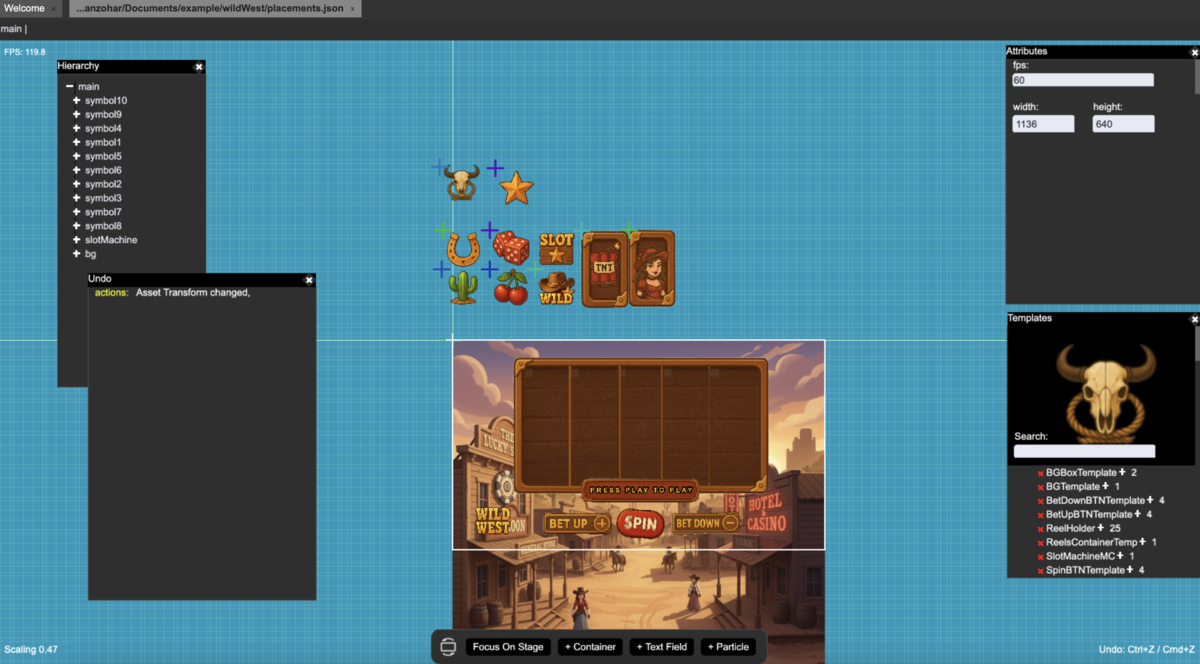
Developer
Loads the entire scene in 5 lines — and ships the game
let scene: ZScene = new ZScene("myScene");
scene.load(loadPath, () => {
    ZSceneStack.push(scene);
    scene.loadStage(this.stage);

    let sceneStage: ZContainer = scene.sceneStage;
    let myBTN: ZButton = sceneStage.get("myBTN") as ZButton;

    myBTN.setLabel("Click Me");
    myBTN.setCallback(() => {
        console.log("Button clicked!");
    });
});
Import Scene into Your Project
Ready to bring your zStudio designs into your game or ad project? Download zImporter to seamlessly load your scenes into Pixi.js, Phaser, and plain HTML projects.
Download zImporter